


LinkedIn Ads Checklist for 2026: Prepare Campaigns to Perform
A campaign can go live on schedule and still be unready to perform. LinkedIn ads need more than a defined budget and launch date. Without a clear business objective, a focused audience and reliable measurement, spend can produce activity without useful commercial insight.
For any team making paid campaigns accountable, the answer isn’t to rush into the platform’s targeting and format options. Connect each decision to the outcome the campaign must support, then decide how you’ll assess progress once it’s live.
This practical checklist helps you assess campaign readiness before investing in LinkedIn Ads. Review your objective, audience, message, creative, budget and tracking, then decide what to monitor after launch. Treat preparation as part of performance, not paperwork. A disciplined plan gives your team a stronger basis for decisions and a clearer view of whether the campaign is moving towards its business goal.
Key Takeaways
- Define the business outcome and the action you want before choosing campaign settings.
- Build your audience around relevant organisations and buying roles, then use exclusions to sharpen its focus.
- Match the offer, message and format to the audience’s likely intent and next step.
- Before launching linkedin ads, test the website journey, conversion tracking, approvals and reporting ownership.
- Review delivery signals first, then assess whether leads and opportunities are commercially relevant.
LinkedIn Ads readiness: define the business outcome before launch
Launching before defining success turns campaign decisions into guesswork. If the objective is vague, you can’t tell whether the audience, advert or follow-up journey needs attention, or whether the activity supports a business priority. Set the outcome first, then choose the campaign approach and measures that will show whether you’re making progress.
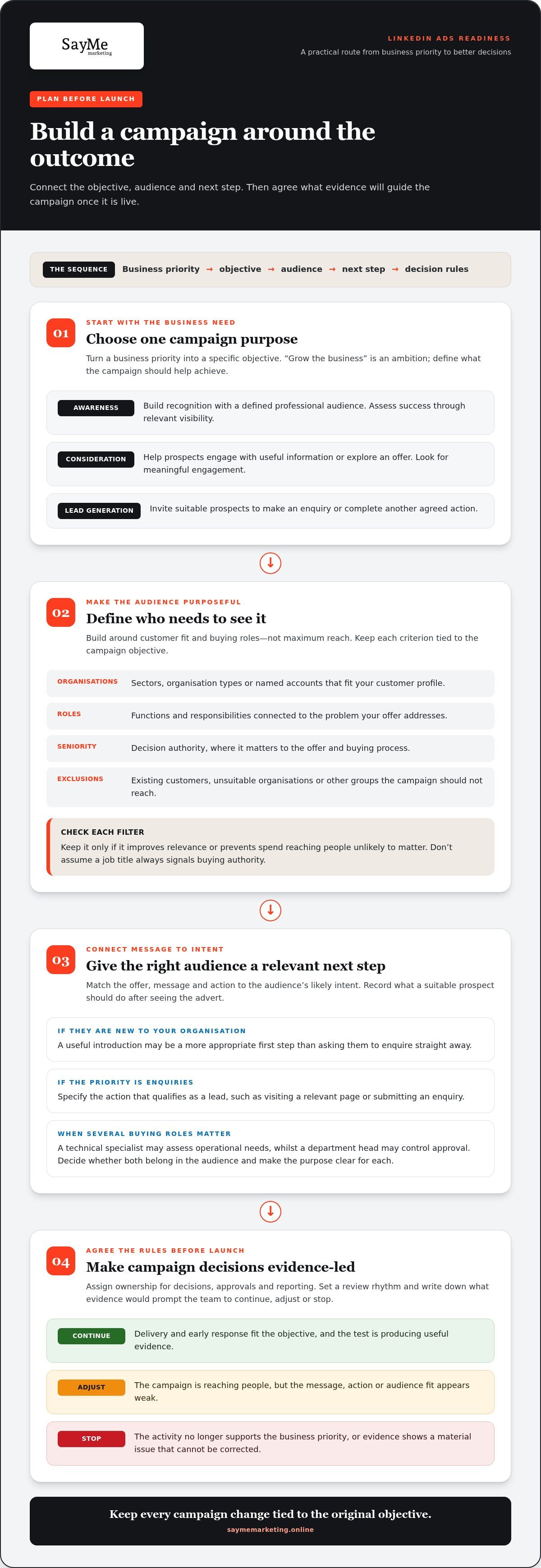
Start with three questions: what business problem needs addressing, which people need to see the campaign, and what should a suitable prospect do next? Keep the answers specific. “Grow the business” is an ambition, not a campaign objective. “Introduce our service to relevant procurement leaders” or “generate enquiries from companies that fit our customer profile” gives the team a clearer basis for action.
Let the objective define success: assess awareness through relevant visibility, consideration through meaningful engagement, and lead generation through suitable prospects taking an intended action. These aims are distinct. Choose the one that fits the business priority, audience and offer.
- Awareness: Build recognition with a defined professional audience.
- Consideration: Encourage prospects to engage with useful information or explore an offer.
- Lead generation: Invite suitable prospects to make an enquiry or complete another agreed action.
Turn a broad B2B ambition into a campaign objective
Translate one business priority into one campaign purpose. If your organisation needs greater visibility with a particular type of buyer, define the campaign around reaching that audience. If prospects need more information before speaking to your team, focus on consideration. If the priority is enquiries, specify the action that qualifies as a lead. Record what a suitable prospect should do after seeing the advert, such as visit a relevant page or submit an enquiry.
Make that action appropriate to the audience’s level of intent. Someone encountering your organisation for the first time may need a useful introduction before being asked to enquire. LinkedIn is a professional networking platform, and LinkedIn’s advertising platform sits within that professional context. Connect the business problem to a message and next step that matter to the people you want to reach. For broader strategic context, explore the LinkedIn advertising practical guide.
Set decision rules before LinkedIn Ads go live
Agree who owns campaign decisions, approvals and reporting before launch. Set a review rhythm and define what evidence would prompt the team to continue, adjust or stop the test. These rules help prevent reactions to isolated results and keep decisions tied to the original objective.
- Continue when delivery and early response are consistent with the objective and the test is producing useful evidence.
- Adjust when the campaign is reaching people but the message, action or audience fit appears weak.
- Stop when the activity no longer supports the business priority or the evidence shows a material issue that can’t be corrected.
Write the rules down. A shared decision framework makes reporting more useful and gives every campaign change a commercial rationale.
LinkedIn Ads audience checklist: focus on relevant decision-makers
A broad audience can look impressive in a campaign plan and still reveal little about whether you’re reaching people who can influence a purchase. Build your audience from customer fit and buying roles, not assumptions about maximum reach. A defined B2B audience also makes campaign learning easier to interpret because you can assess responses against a recognisable group of potential buyers.
Before setting up linkedin ads, document the audience in business terms. Identify the types of organisations that are a credible fit, the professional roles involved in the purchase, the seniority relevant to the decision and any groups to exclude. Check each criterion against the campaign objective. A filter earns its place only if it improves relevance or prevents spend reaching people who are unlikely to matter.
- Organisations: Record the sectors, organisation types or named accounts that align with your customer profile.
- Roles: List the functions and job responsibilities connected to the problem your offer addresses.
- Seniority: Specify decision authority only where it matters to the offer and buying process.
- Exclusions: Note existing customers, unsuitable organisations or other groups that should not receive the campaign.
Describe the people involved in the buying decision
Purchases often involve more than one role. Map who identifies the need, who evaluates possible solutions, who influences the choice and who approves the investment. Separate the primary decision-maker from supporting stakeholders when that distinction affects your message. Validate the map against customer conversations, sales feedback and existing account knowledge. Don’t assume a job title always signals buying authority.
For example, a technical specialist may assess whether a solution meets operational needs, whilst a department head may control approval. Both roles could be relevant, but they may need different messages and calls to action. Use what you know about your sales process to decide whether to include both, and make the campaign purpose clear for each group.
Keep audience scope purposeful and testable
Review every targeting criterion before launch. Ask what evidence supports its inclusion and whether it serves the campaign objective. Don’t add filters simply because they appear in the platform. Stacking assumptions can narrow reach without improving fit. LinkedIn’s targeting options can change, so review the current Campaign Manager settings before relying on particular criteria. Zapier’s guide to effective LinkedIn Ads campaigns also considers audience decisions alongside objectives, creative and lead nurturing.
Use Matched Audiences only when you have an appropriate source that can be used lawfully for the intended campaign. Sources might include relevant website visitors, company lists or known contacts, provided the source and intended use are suitable. Keep a brief record of the audience rationale, exclusions and assumptions. This gives the team a sound basis for reviewing delivery and refining the audience without changing several variables at once.
If audience definition is a strategic sticking point, work with a marketing strategy partner to connect customer fit, buying roles and campaign decisions.
LinkedIn Ads message and format checklist: match the experience to intent
An advert is only as relevant as the experience it creates after someone notices it. Match the offer, message and call to action to what the audience is ready to do. A useful introduction may suit someone still assessing a problem; a direct enquiry request may fit a prospect actively comparing solutions. Choose the experience deliberately, rather than assuming one format will outperform another.
Make the advert relevant to the audience’s problem
Lead with a concrete business challenge the intended audience will recognise. Keep the promise precise, then make sure the destination delivers on it. If the advert offers guidance on improving a process, the next step should lead to relevant guidance, not a generic home page. Use evidence or proof points only when your organisation can substantiate them. Credibility depends on a consistent promise, not inflated claims.
Before approval, check that the advert answers three questions: who is this for, what problem does it address, and what should the person do next? Remove claims that could apply to any organisation. Specificity gives the right prospect a reason to continue and helps the team assess whether the message fits the offer.
Choose an ad experience that supports the next step
Sponsored Content places the advert in the LinkedIn feed, where the creative and copy need to earn attention and make the next action clear. A Lead Gen Form can keep lead capture within the platform, which may reduce friction when the offer and requested information are straightforward. A website destination may suit a deeper conversion journey, such as exploring a detailed service page before enquiring.
Use this simple comparison to frame the decision. It’s a planning aid, not a performance ranking:
- Purpose: Use Sponsored Content to present a relevant message in the feed; use a Lead Gen Form when the intended action is submitting an enquiry or details.
- Experience: Sponsored Content directs attention through its creative and call to action; a Lead Gen Form keeps form completion on-platform, whilst a website destination takes the prospect to your own page.
- Suitable context: Choose based on the offer, the information needed to act and the depth of the journey, not a blanket belief that one format always performs best.
Before choosing, review the current LinkedIn Ads formats, Campaign Manager options and any associated requirements. Platform features can change, so base the plan on the options available when you build the campaign.
Finally, review the full sequence as one experience: creative, copy, offer, call to action and destination. Does the wording set an expectation the next step fulfils? Is the requested action proportionate to the value offered? This alignment makes linkedin ads more coherent for the prospect and gives your team a clearer basis for evaluating the response.
LinkedIn Ads tracking and launch checklist: make measurement usable
Measurement must be in place before spend begins, not added after the first report. A click, impression or form submission is observable platform activity; a commercially qualified lead or sales opportunity requires agreed criteria and validation beyond the platform. Connect campaign data to the business outcome, and decide who will interpret each signal.
The LinkedIn Insight Tag is a website tag that supports measurement of actions people take after interacting with LinkedIn campaigns. Its use depends on a correctly configured website and current platform requirements. Before relying on it, review LinkedIn’s latest setup guidance and coordinate implementation with whoever manages your website and analytics. Don’t assume a tag is working simply because it has been added.
Check the measurement path before paying for reach
Test the complete journey from advert to destination and conversion. The page should load, reflect the advert’s promise and make the intended action clear. Have the responsible team verify that the chosen conversion action is recorded as expected. Align marketing and sales definitions too: agree what counts as an enquiry, a qualified lead and an opportunity, and assign an owner for reporting and follow-up.
Use this sequence to complete the pre-launch checks in order:
- Test the destination: Open the advert’s link on relevant devices and confirm the page loads, matches the message and presents the intended next step.
- Verify conversion measurement: Check the conversion action, Insight Tag or other tracking approach with the team responsible for the website and analytics. Confirm current setup requirements before relying on reported data.
- Align reporting definitions: Decide which platform signals marketing will report and how sales will assess lead suitability and opportunity progression.
- Complete approvals: Secure the required reviews for advert copy, creative, destination and campaign settings. Record who has authority to approve changes after launch.
- Review Campaign Manager settings: Check the objective, audience, creative, destination, schedule and budget together. Confirm that the campaign name and structure will make results identifiable in reports.
- Record the baseline and launch date: Capture relevant starting context and note when the campaign begins, so later reviews have a clear comparison point.
Complete final Campaign Manager checks
Run one final end-to-end review rather than approving each element in isolation. A relevant audience paired with a broken destination still wastes the opportunity; accurate tracking attached to the wrong conversion action still misleads the report. Confirm reporting ownership, the review date and where decisions will be recorded. This creates a useful audit trail for interpreting results and making controlled adjustments.
Before your next campaign goes live, get support with accountable LinkedIn campaign planning so tracking, approvals and reporting are built into the launch process.
LinkedIn Ads post-launch checklist: turn early evidence into better decisions
Once a campaign is live, disciplined review matters more than constant intervention. Use recurring check-ins to trace performance from delivery through to the business outcome, and compare the evidence with the objective you set before launch. Early signals can help diagnose a problem, but they don’t prove the campaign is generating commercially useful leads or opportunities.
Review campaign signals without reacting to noise
Start with delivery: is the campaign reaching its intended audience and spending as planned? Then review engagement and the next step, such as visits, form submissions or enquiries. Finally, work with sales to understand whether those responses fit your customer profile and are progressing towards a genuine opportunity. Platform activity is useful evidence, not a substitute for commercial qualification.
Compare equivalent periods and note any changes that could affect interpretation, including edits to the audience, creative, offer or destination. If activity drops at a particular point in the conversion path, investigate tracking and the website journey before changing targeting or copy. A broken page or misreported conversion can make a sound campaign look ineffective.
- Delivery: Check reach, impressions and spend against the campaign plan.
- Engagement: Review clicks and other relevant interactions in relation to the objective.
- Conversion: Check whether the intended action is being recorded and whether the destination works.
- Lead quality: Ask whether enquiries match the agreed qualification criteria and develop into useful sales conversations.
Build a disciplined optimisation routine
Make reviews consistent, not reactive. Where practical, change one meaningful variable at a time so the team can understand what may have influenced a shift. Record the date, the adjustment, the reason for making it and the evidence considered. If several elements change together, it becomes harder to distinguish a useful signal from coincidence.
Keep a simple campaign log alongside reports. Note the period reviewed, the objective, observed delivery and conversion signals, lead-quality feedback, decisions made and the next review point. This gives colleagues a shared view of what happened and why, especially when campaign ownership or sales feedback involves more than one person.
SayMe Marketing takes a data-backed approach and provides transparent reporting to support accountable campaign decisions. That means examining evidence in context, documenting what it shows and using it to inform the next step, without treating any outcome as guaranteed. If your team needs strategic support to structure that review process, explore SayMe Marketing’s LinkedIn strategies.
Use the checklist to decide whether the campaign is delivering useful evidence, needs a targeted adjustment or requires a deeper review. The goal isn’t to make changes for their own sake. It’s to build a clearer picture of audience response and commercial relevance over time.
Turn campaign readiness into a lasting advantage
A launch plan shouldn’t be filed away once a campaign goes live. Treat it as a decision framework your team can return to as priorities shift, new evidence emerges and the market changes. That discipline helps keep linkedin ads connected to business needs, rather than allowing activity to become the measure of success.
When your team needs additional strategic capacity, SayMe Marketing brings a data-backed approach, transparent reporting and more than 25 years of combined team experience. Campaign work is tailored to client budgets, with a focus on accountable, commercially grounded decisions rather than a promised outcome.
Ready to plan your next move? Explore SayMe Marketing’s LinkedIn strategies and build a campaign approach that gives your team a stronger basis for action.
Frequently Asked Questions
What are LinkedIn Ads?
LinkedIn Ads are paid placements that let organisations promote content, offers or other actions to people using LinkedIn. Businesses use them to reach professional audiences, such as people in particular roles or industries. For example, a firm could promote an industry briefing to professionals likely to be interested in its subject. The campaign’s purpose determines what the advert asks people to do and how its contribution is assessed.
Can you run LinkedIn Ads without a company page?
Campaign setup requirements can vary, so review the relevant Campaign Manager workflow before creating an advert. Confirm that the people managing the account have the necessary permissions. Even where a particular setup permits advertising without a company page, prospects may look for a company presence to understand who is behind the advert. Give them enough context to assess the business.
How much should a business budget for LinkedIn Ads?
There’s no universal budget that suits every business or campaign. Set a test amount that reflects your objective, intended audience, conversion journey and how much evidence you need before making a decision. Include the time and resources needed to review results, not just media spend. For example, decide in advance what question the test should answer, then use the evidence collected to guide later budget decisions.
Are LinkedIn Ads suitable for small businesses?
They can be suitable if a small business has a defined B2B audience, a relevant offer and the capacity to evaluate campaign activity. Consider whether reaching that professional audience supports a clear commercial priority and whether your team can respond to enquiries appropriately. A focused test can provide useful learning, but it shouldn’t be treated as a guaranteed source of leads or revenue. Judge suitability against your own resources and objectives.
How long does it take for LinkedIn Ads to be approved?
Approval timing can vary according to the advert, account and LinkedIn’s review process, so don’t plan around an assumed turnaround. Submit campaign materials with time for review and possible revisions before a time-sensitive promotion. Check the campaign status in Campaign Manager and review current advertising policies before submission. If an advert needs changes, use the stated reason to guide revisions rather than resubmitting an unchanged version.
Can LinkedIn Ads send people to a website outside LinkedIn?
Yes, an advert can direct people to an external website when the campaign setup supports that destination and the advert meets LinkedIn’s requirements. Before launch, open the page on a mobile device and check that it loads, matches the advert’s offer and makes the next action clear. If your analytics tools support campaign tracking conventions, apply them consistently so website visits from the campaign can be distinguished in reporting.
Why might LinkedIn Ads be rejected?
An advert may be rejected if its content, destination or use of personal attributes conflicts with LinkedIn’s current advertising policies. Check the rejection notice and review the relevant policy before making a correction. Look for unsupported claims, unclear offer details or a landing page that doesn’t match the advert. Review compliance during campaign preparation, then confirm the revised creative and destination address the issue before resubmitting.
1 Comment
LinkedIn Marketing: A Practical Guide to B2B Growth in 2026
October 14, 2026[…] Treat spend as a way to distribute a useful message, not a shortcut to trust. The dedicated LinkedIn Ads campaign checklist explores paid activity in more […]